Free bulk image resizer for ecommerce: what to look for and how to do it (2026)
How to batch resize product photos for free for Amazon, Etsy and Shopify: built-in OS tools, browser tools, and the quality traps that ruin listings.
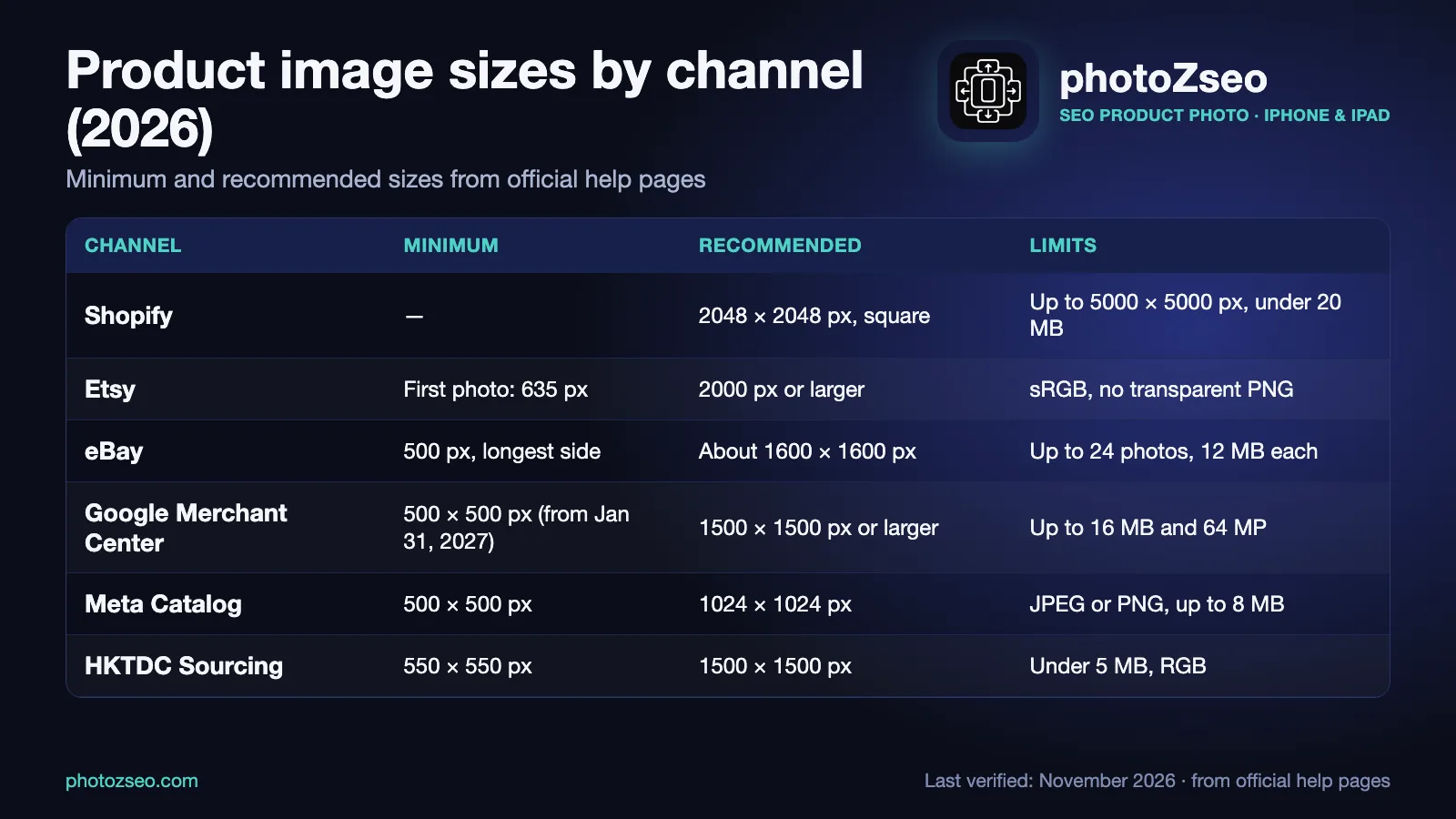
Yes, you can bulk resize product photos for free. Your computer’s built-in tools, free browser-based resizers and the free tiers of some apps all handle a batch in minutes. The hard part is not resizing. It is choosing target sizes that match each marketplace, keeping the aspect ratio intact, and not damaging color or file size on the way. This guide covers the free options honestly, what to check in any tool, and a settings table you can copy.
Last verified: November 2026. Sources: Shopify Help Center (“Product media”), Etsy Help Center (“How to Add Photos to Your Listings”), Amazon Seller Central (“Technical image file requirements”), Apple Support (“Change camera formats”). Marketplaces change rules often, so check the current page before a big upload.
What do the marketplaces actually ask for?
Only a few numbers are firm, and several “rules” you see online are really recommendations.
| Platform | What the official page says | Source |
|---|---|---|
| Shopify | 2048 x 2048 px square usually displays best; up to 5000 x 5000 px or 25 megapixels; under 20 MB; PNG and JPEG preferred, WebP and HEIC also accepted | Shopify Help Center, “Product media” |
| Etsy | Aim for at least 2000 px in width and height; first photo at least 635 px; JPG, GIF, PNG, SVG, HEIC accepted; files over 1 MB may fail to upload on slow connections; use sRGB | Etsy Help Center, “How to Add Photos to Your Listings” |
| Amazon | Prefers images larger than 1,000 px on the longest side for zoom; JPEG recommended, TIFF, PNG and non-animated GIF accepted | Amazon Seller Central, “Technical image file requirements” |
For anything else (minimums, maximums, background rules), check the platform’s current guidelines. Third-party blogs often state a recommendation as a hard limit. If you need a deeper look at a single platform, see our guides on Amazon photo specs and Shopify image sizes.
What are the free ways to batch resize photos?
| Option | Good for | Watch out for |
|---|---|---|
| Built-in OS tools (for example Preview on macOS, or Microsoft’s free PowerToys Image Resizer on Windows) | Quick resize of a folder to one set size, no upload | Usually one target size at a time; limited control over format and compression |
| Free browser-based resizers | No install, any device | Check whether files are processed locally or uploaded; free tiers often cap batch size or add watermarks |
| Free tiers of apps and extensions | Marketplace presets, renaming, export in one step | Free limits differ by product; read them before you plan a catalog around them |
| Command-line or scripts | Thousands of images, repeatable | Needs technical comfort; easy to overwrite originals |
None of these is universally best. The right choice depends on how often you do it and for how many marketplaces.
What should you look for in a bulk resizer?
Use this checklist when comparing any tool, free or paid.
- It keeps your originals. Output goes to a new folder. Resizing in place is how people lose their only full-resolution file.
- It preserves aspect ratio, or lets you choose how to fit. A forced crop can cut off a product edge. Decide between padding to a square canvas and cropping, and check a few results.
- It converts to sRGB. Etsy specifically says to use sRGB for web images. A photo in a wide-gamut profile can look dull or oversaturated in some viewers.
- It controls format and quality. You want to pick JPEG quality yourself rather than accept a default that bloats or crushes the file.
- It handles HEIC. iPhones may save HEIC by default. Apple’s setting lets you switch to “Most Compatible” to save JPEG, but old photos are already HEIC, so your tool should convert them.
- It does not upscale silently. Etsy’s guidance notes that enlarging can cause pixelation. A tool should warn or skip small files.
- It handles privacy. Know whether photos leave your device.
What are the common quality traps?
- Cropping the product. Square presets cut off long products such as rugs, posters and tools. Pad instead of crop when the object touches the frame.
- EXIF data. Phone photos can carry location and device data. Stripping it before publishing is a sensible habit, though some tools keep it by default. Note that EXIF orientation also matters: a photo that looks upright on your phone can appear rotated after a poor resize.
- Color profile. Convert to sRGB, as above. CMYK is for print, per Etsy.
- Double compression. Each JPEG re-save loses a little quality. Resize once from the original, not from a previously exported copy.
- File size vs. upload failures. Etsy notes files over 1 MB may fail on slower connections, so aim for a balance between sharpness and weight.
- Transparent PNGs. Etsy says transparent areas appear black. Flatten onto a solid background before uploading.
- WebP vs. JPEG. WebP is smaller at similar quality and Shopify accepts it, but JPEG is the safe universal choice for marketplaces. Our WebP, JPEG and PNG comparison goes deeper.
What settings should you use? (practical table)
Use these as a starting point and then compare against the platform’s current guidelines.
| Goal | Longest side | Format | Notes |
|---|---|---|---|
| Your own Shopify store | 2048 px (square 2048 x 2048) | JPEG, or WebP if you want smaller files | Stay under the 5000 x 5000 px / 20 MB limits |
| Etsy listings | 2000 px or more | JPEG, sRGB | Make the first photo landscape or square; keep file weight reasonable |
| Amazon main images | Well above 1,000 px | JPEG | Check Amazon’s current image guidelines for background rules |
| Archive master | Original size | Original | Never overwrite; resize copies |
A simple free workflow
- Copy originals into a folder named “originals” and never edit them.
- Decide your target sizes from the table above.
- Batch resize copies into a separate folder per marketplace.
- Spot check five images: crop, orientation, sharpness, color.
- Rename files to something descriptive before upload. See how to name product photos for SEO.
Where photoZseo fits
If you resize for several marketplaces regularly, doing it by hand gets repetitive. photoZseo’s iOS and iPadOS app (iOS 17+) resizes, compresses and renames photos for 46 marketplaces, and has a Free plan; see pricing for current plan limits. The Chrome extension works from product pages in Chrome 116+, with 82 size profiles. Its free tier covers 5 products and 10 images per day, and your data stays in the browser. Neither tool replaces checking each marketplace’s own current rules.
photoZseo is not affiliated with or endorsed by any marketplace. Marketplace names are used only to describe compatibility.
Frequently asked questions
What is the best free way to bulk resize product images?
For a one-off batch, the tools built into your operating system or a browser-based resizer are enough. For repeated work across several marketplaces, look for a tool that saves per-marketplace size presets, so you do not re-enter dimensions each time.
What size should product images be for Shopify?
Shopify's help center says a 2048 x 2048 px square usually displays best, with images up to 5000 x 5000 px (25 megapixels) and under 20 MB accepted.
What size should Etsy listing photos be?
Etsy's help article recommends at least 2000 px in width and height, and says the first photo should be at least 635 px so it does not rank lower in search.
Does resizing a photo reduce its quality?
Shrinking an image keeps it sharp when done once from the original. Enlarging a small image causes pixelation, and repeatedly re-saving a JPEG adds compression artifacts, so always resize from your original files.
Should I use WebP or JPEG for marketplace uploads?
Use JPEG for marketplaces unless their guidelines say otherwise, because it is the universally accepted format. WebP is useful on your own store, where Shopify lists it as accepted, but check each marketplace's current guidelines first.
Is a free resizer safe for product photos?
It depends on where processing happens. Prefer tools that run on your device or in your browser, and read the privacy statement before uploading unreleased product photos to a web service.