Product data feed image requirements: Google Merchant Center and Meta Catalog (2026)
Image specs for Google Merchant Center and Meta Catalog feeds: minimum pixels, recommended size, formats, file limits, and why images get flagged.
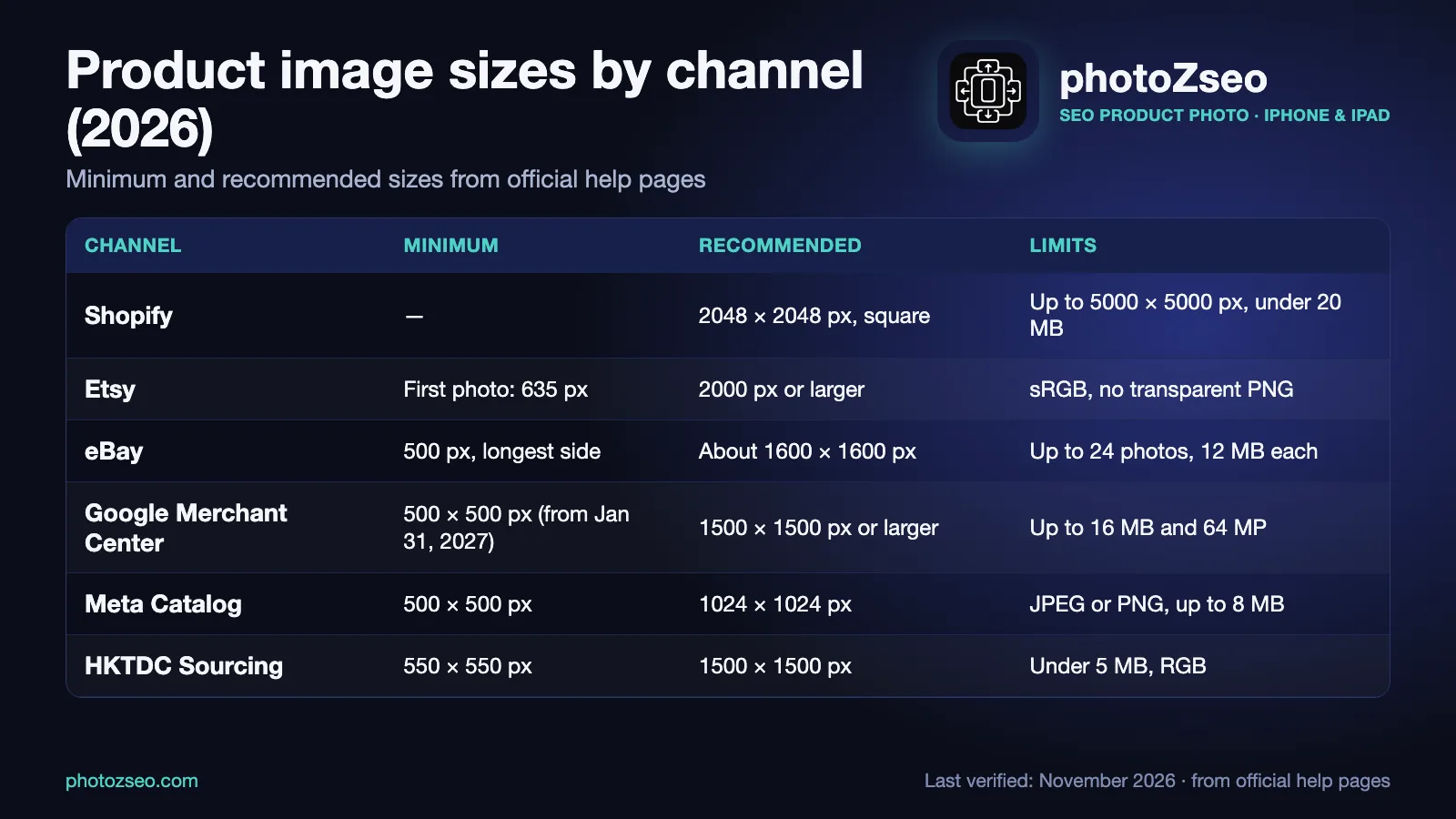
The short answer: for both Google Merchant Center and Meta Catalog, send a square JPEG of at least 1500 x 1500 pixels, showing the real product on a clean background, with no text, badges or watermarks. Google’s hard floor is 500 x 500 px (for all products from 31 January 2027) and Meta’s is 500 x 500 px as well, but both platforms recommend larger files. The tables below give the exact numbers from each platform’s own documentation.
Last verified: November 2026. Sources: Google Merchant Center Help (“Image link [image_link]”, “Additional image link [additional_image_link]”, “How to fix: Image too small”); Meta Business Help Center (“Product image specifications for catalogues”); Meta for Developers (“Catalog fields”).
Google Merchant Center vs Meta Catalog: side-by-side
| Requirement | Google Merchant Center | Meta Catalog |
|---|---|---|
| Main image field | image_link | image_link |
| Accepted formats | JPEG, WebP, PNG, GIF, BMP, TIFF | JPEG, PNG |
| Maximum file size | 16 MB (and 64 megapixels) | 8 MB |
| Minimum size | 500 x 500 px for all products from 31 Jan 2027 (before that: 100 x 100 px, or 250 x 250 px for clothing) | 500 x 500 px |
| Recommended size | 1500 x 1500 px or larger | 1024 x 1024 px (Shops on Facebook and Instagram) |
| Aspect ratio | No fixed ratio stated; Google may apply subtle cropping | Shops display 1:1 square; carousel ads work best when all images share one ratio (1:1 or 4:5) |
| Additional images | Up to 10 (additional_image_link) | Up to 50 (additional_image_link) |
| Product framing | Product should fill about 75% to 90% of the image | Main image should show the entire product |
| URL rules | http/https, ASCII only, RFC 3986, 1 to 2,000 characters | Use the URL of the current product image |
For the Google deadline in detail, see our earlier post on the Google Shopping 500 x 500 px minimum.
What does the Google 500 x 500 px rule change?
Until 31 January 2027, Google’s troubleshooting page still lists lower thresholds: 100 x 100 px for most products and 250 x 250 px for clothing. After that date the 500 x 500 px minimum applies to every category. Google states that images below the minimum will not be shown, though the product itself is not disapproved. Google also notes that YouTube Shopping ads need images of at least 500 x 500 px to appear on TV.
Practical consequence: a feed full of 300 px thumbnails will not break your listings outright, but those products lose their image where it matters. Re-export from the originals instead of upscaling a thumbnail.
What does Meta require for catalog images?
Meta’s help article lists these basics: at least one image per product, JPEG or PNG, 8 MB maximum, and the image must accurately represent the specific product for sale. For Shops on Facebook and Instagram, product images are shown as a square (1:1), with a 500 x 500 px minimum and 1024 x 1024 px recommended.
Meta also suggests four or more images per product, a clear main image showing the whole product, a mix of angles and close-ups, the same images as on your website, a white backdrop, and JPEG over PNG for image quality.
How does Meta crop catalog images?
In Commerce Manager (Settings, then Catalogue) you pick one of three cropping modes: fill frame with image (the default, which zooms in), show entire image in frame (white space may be added), or crop and resize to fit the frame. Meta says images are not cropped anywhere else in Shops on Instagram and not at all in Shops on Facebook, apart from the Instagram product page setting. If your catalog mixes aspect ratios, carousel ads may adjust them automatically; supplying every image in the same ratio (1:1 or 4:5) avoids that.
Why do product images get flagged or disapproved?
Both platforms list near-identical problems. Check your feed for these first:
| Problem | Meta | |
|---|---|---|
| Text overlays, promo codes, calls to action | Not allowed (price, shipping, promotional text) | Not recommended (overlay text, calls to action, promo codes) |
| Watermarks, added logos | Not allowed unless physically part of the product | Not recommended |
| Placeholder images (“image coming soon”) | Not allowed | Avoid; new images need a new URL to refresh |
| Borders | Not allowed | Not mentioned in the spec |
| Generic graphics instead of the product | Not allowed (exceptions for some hardware, vehicle and software categories) | Image must represent the exact product |
| Too small | Image not shown (after 31 Jan 2027) | Below 500 x 500 px does not meet spec |
| Crawler access | Allow Googlebot and Googlebot-image in robots.txt; changes take 24 to 48 hours | Not specified in the spec |
| File type mismatch | Extension must match the real format | JPEG or PNG only |
Two feed-specific traps are easy to miss. First, Google wants stable URLs without dynamic parameters such as timestamps or session IDs. Second, Meta only refreshes a replaced image if the new file has a different URL, so overwriting shoe.jpg in place will not update your catalog.
One export that satisfies both feeds
- Start from the original, uncompressed photo.
- Export a 1:1 square at 1500 x 1500 px or more as JPEG (under 8 MB, comfortably under both limits).
- Keep the product at roughly 75% to 90% of the frame on a clean background.
- Remove overlays, badges, watermarks and borders from the feed image; keep promotional versions for ads.
- Use a descriptive file name and a stable, crawlable URL.
- Put extra angles in
additional_image_link(Google: up to 10).
Where photoZseo fits
If you prepare images for many marketplaces and feeds, photoZseo on iPhone and iPad resizes, compresses and renames product photos for 46 marketplaces from one shot, and the Chrome extension does the same from product pages with SEO file names and bulk export. Our marketplace image size guide lists the per-marketplace numbers.
photoZseo is not affiliated with or endorsed by any marketplace, Google or Meta. Always check the platforms’ current guidelines before a large upload.
Frequently asked questions
What are the Google Merchant Center image requirements in 2026?
Use an http/https image_link in JPEG, WebP, PNG, GIF, BMP or TIFF, up to 16 MB and 64 megapixels. Google recommends 1500 x 1500 px or larger, and a 500 x 500 px minimum applies to all products from 31 January 2027.
What is the minimum image size for a Meta catalog?
Meta's product data specification requires at least 500 x 500 pixels for the main image, in JPEG or PNG under 8 MB. For Shops on Facebook and Instagram, Meta recommends 1024 x 1024 pixels.
How many additional images can I add to a product feed?
Google's additional_image_link accepts up to 10 additional images. Meta's catalog fields reference allows up to 50 additional image URLs.
Can I use the same image file for Google Shopping and Meta?
Usually yes. A square JPEG of 1500 x 1500 px or more, showing the real product on a clean background with no text or watermarks, meets both platforms' published rules.
Why does Meta or Google flag my product image?
Common causes are overlay text, promo badges, watermarks, borders, placeholder images such as "image coming soon", images that are too small, and image URLs that block crawlers or do not match the file type.