How to resize product photos for multiple marketplaces at once
Amazon, eBay, Etsy, Shopify and Trendyol each want different image sizes. A step-by-step workflow to shoot once and export every marketplace version — sizes, backgrounds, compression and file names.
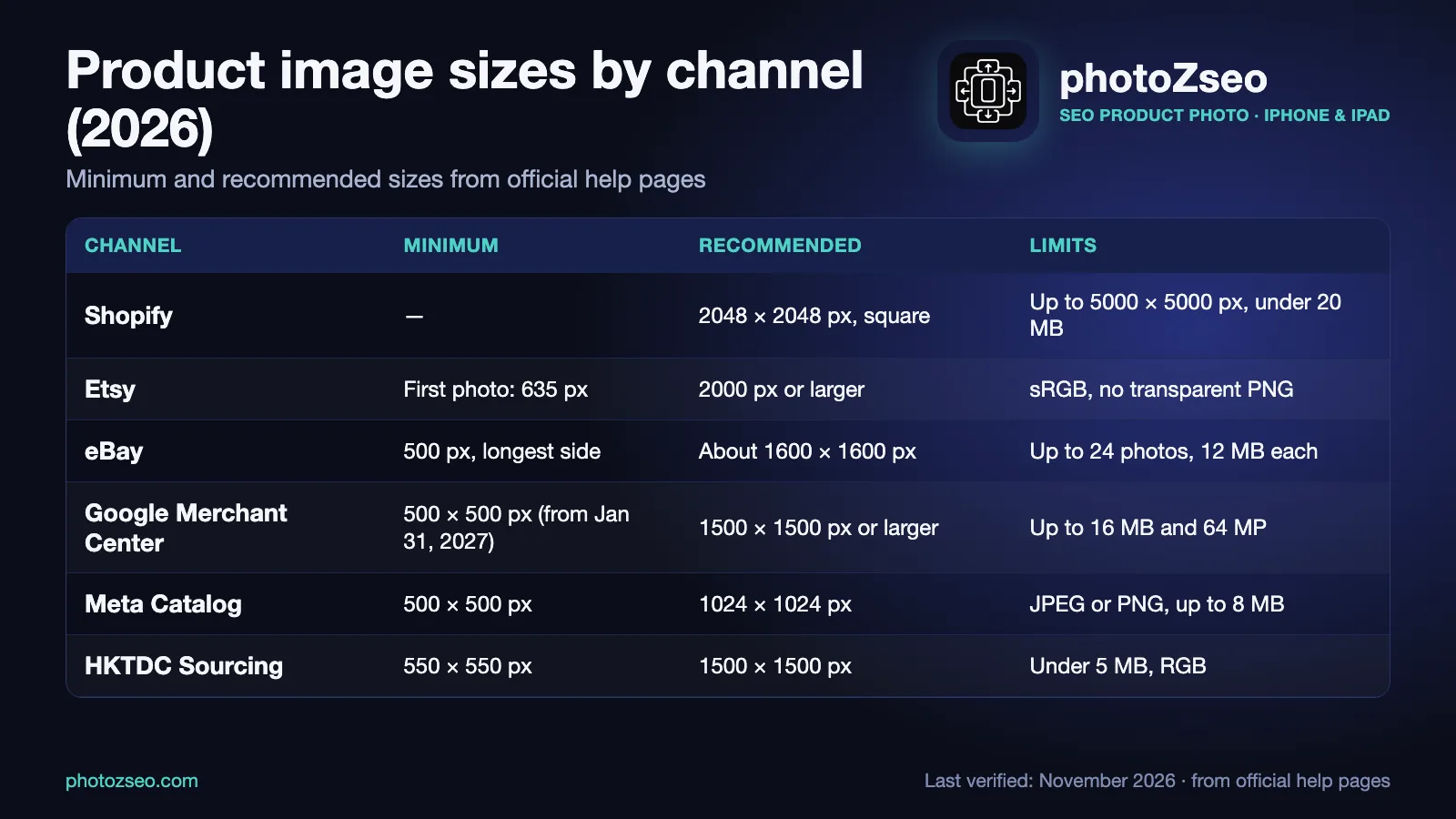
Selling on several marketplaces usually means editing the same photo again and again. A simple workflow fixes that: one master photo, many exports.
Step 1: Shoot one good master
- At least 2000 px on the shortest side. Every marketplace version is then a downscale, never an upscale.
- Square framing with margin, so you can crop to 1:1 or 3:4 later.
- Plain background and even light — it makes the white main image easy.
Step 2: Make two kinds of images
- Main image: product only, pure white background (RGB 255, 255, 255), product filling most of the frame. Required by Amazon and Walmart; works everywhere.
- Secondary images: other angles, details, scale and lifestyle shots.
Step 3: Know the targets
| Marketplace | Size to export |
|---|---|
| Amazon | 2000 × 2000 px, white background |
| eBay | ≈ 1600 × 1600 px (min. 500 px) |
| Etsy | 2000 px or larger |
| Shopify | 2048 × 2048 px |
| Trendyol / Hepsiburada | Check the seller panel; square or 3:4 |
Official sources for each are in our marketplace image size guide.
Step 4: Export each version properly
For every marketplace:
- Resize to the target size and aspect ratio.
- Convert to JPEG (sRGB); use PNG only where transparency is needed.
- Compress to roughly 200–600 KB.
- Rename descriptively:
acme-walnut-board-large-front.jpg(how to name product photos). - Strip GPS and other private metadata.
Step 5: Automate it
Doing step 4 by hand for 5 marketplaces × 6 photos × 20 products is 600 files. photoZseo does it in one export on iPhone and iPad: it keeps your master photos and writes a correctly sized, compressed and named copy for each of up to 46 marketplaces, plus a CSV/XLSX listing file. The free plan covers up to 5 marketplaces — see pricing.
Frequently asked questions
Can I use the same photo for Amazon, eBay and Etsy?
Yes, if it is large enough and on a pure white background. A 2000 × 2000 px square JPEG meets Amazon's and Etsy's recommendations and is above eBay's 500 px minimum.
Why not upload one huge photo everywhere?
Marketplaces re-compress large files, sizes and aspect ratios differ (some fashion marketplaces prefer 3:4 portrait), and descriptive file names should match each store's language.
What is the fastest way to resize photos for many marketplaces?
Use a tool with marketplace presets that exports every version from one master photo in a single step, such as photoZseo on iPhone and iPad.